Using Menu Bar
Displaying in the Top Pane is the Menu Bar. The Menu Bar includes menu titles. Some menu titles provide access to drop-down menus that are comprised of a collection of menu items, and some are simply buttons to quickly access the most often used searches. Collectively, you can use menu titles to perform any of the TitlePoint functions.
Note: Some menu options might be grayed-out or not even display because customers in different regions subscribe to use only certain system functions, and some functions might be unavailable in some regions.
|
Menu Bar Item |
Description |
|
--AND--
|
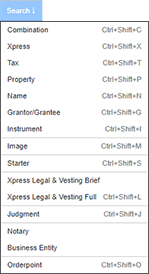
Use Search to run the following searches: Values by search types are Keyboard Shortcuts. |
|
|
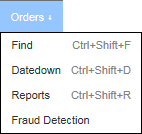
The Orders Title allows you to do the following with orders:
Note: The Fallout menu option only displays if you have access to title units with the Fallout permission. Values by search types are Keyboard Shortcuts. |
|
|
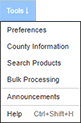
Use Tools to:
|
|
|
Click Help to launch the Online Help in a separate browser window, displaying a screen shot of the TitlePoint window you are currently viewing. Click portions of the screen shot to read information about how to perform your current task. See Using Online Help. |


Related Topics