Reporting Discrepancies
You can submit a Discrepancy Report when you discover that documents, maps, or starters are mis-posted, missing from chains, or mapped incorrectly, thus resulting in an incorrect document. It can also be used to notify PI if the quality of a particular document (or documents) is poor and requires replacing with a new scanned image.
To report a discrepancy:
-
Either:
-
Right-click the name in the record in question and choose Report Discrepancy.
-
Click
 next to the instrument(s) of interest and click the Report Discrepancy button.
 -
Click Report Discrepancy in other portions of the application where Report Discrepancy buttons display.
-
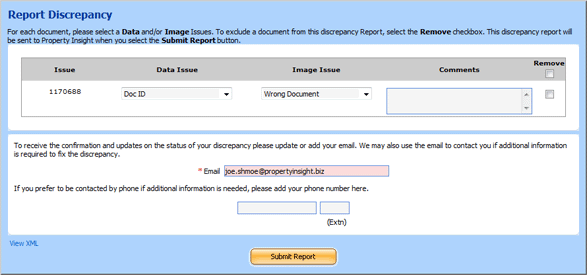
Complete the Discrepancy FormDiscrepancy Form and click Submit Report.
You can also report a discrepancy from iView. See iView Help for additional details.
Please contact Support at 818-773-7117 if you have further questions.
Related Topics