Hiding Released Documents
This feature hides all documents marked with either a check (released) or a clock (out by time).
To hide released documents:
-
When viewing name or property search results, click the Options Menu to display Options Menu choices.
-
Choose Hide Released Documents to hide all released documents, including the releases.
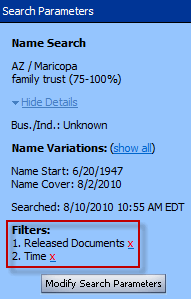
When Viewing_Name_Search_Results, choosing this option engages and displays two specific filtering actions in Search Parameterstwo specific filtering actions in Search Parameters: Released Documents and Time. However, while two filtering options are activated when using Hide Release Documents, you can Undo_the Filter of each individually.
Related Topics